

Notion AI Review 2026: Is It Worth It?
I used to run three separate browser tabs just to get through a Monday: Notion for notes, ChatGPT for drafting, and a scattered pile of meeting minutes I never had time to organize. Somewhere around the third rewrite of a status update, I gave in and turned on Notion AI properly instead of just poking at it occasionally — and it quietly ate most of that busywork.
This review isn’t a feature list copied from a changelog. It’s what Notion AI is actually good at in 2026, what it still can’t do, and five workflows worth setting up this week if you’re already living inside Notion.
What Is Notion AI in 2026?
Notion AI has moved well past “highlight text, click improve.” The workspace now runs on a multi-model backend — as of early 2026, users can pick between GPT-5.2, Claude Opus 4.5, and Gemini 3, or let an “Auto” setting choose the best model per task, according to a detailed Notion AI guide from Dan Cumberland Labs.
The bigger shift is structural. Notion AI is no longer a bolt-on writing tool — it’s become what one reviewer at eesel AI calls an eight-part suite spanning an on-demand Agent, scheduled Custom Agents, Enterprise Search, AI Meeting Notes, Research Mode, database autofill, and custom AI blocks. That’s a meaningfully different product than the one that launched in 2023.
Notion AI Pricing in 2026: What You Actually Pay
Here’s where a lot of confusion comes from. The old $10/month AI add-on is gone. Full AI access now sits behind the Business tier, and Notion added a separate credit system for autonomous agents.
| Plan | Monthly Cost (per seat) | AI Access |
|---|---|---|
| Free | $0 | None |
| Plus | $10 (annual) / $12 (monthly) | Limited AI trial only |
| Business | $20 (annual) / $24 (monthly) | Full AI suite included |
| Enterprise | Custom | Full AI suite + advanced controls |
On top of the seat price, Custom Agents — Notion’s autonomous, scheduled workflows — now draw from a separate pool of Notion Credits priced at $10 per 1,000, a change that took effect on May 4, 2026, according to pricing coverage from Fello AI. Your day-to-day AI writing, the built-in Notion Agent, and workspace search don’t touch this meter — it’s specifically for agents running unattended in the background.
Practically, this means the real “Notion AI price” for most teams is $20/seat/month minimum, plus credits if you lean on scheduled automation. If you’re a solo user who mostly wants writing help, it’s worth comparing that against a standalone AI subscription before committing to Business.
The Features That Actually Move the Needle
Notion Agent
This is the on-demand assistant that can build pages, update databases, and pull answers from across your workspace in one request. It behaves less like autocomplete and more like a junior analyst who already knows your files — which is the single biggest reason teams justify the Business upgrade.
Custom Agents
These run on a schedule or trigger (a new database row, a Slack message) without anyone opening Notion. One IT operations manager described replacing a legacy ticketing workflow with Custom Agents that triage requests with over 95% accuracy and resolve a quarter of tickets without human input, per a case study cited by Perplexity AI Magazine.
AI Meeting Notes (Beta)
Auto-transcribes and summarizes calls without a bot joining the meeting. Useful, but still labeled Beta for a reason — treat the output as a first draft, not a final record.
Database Autofill
Point it at a property column and it fills the field based on page content — status, category, sentiment, whatever you define. This is the closest thing Notion AI has to true automation, though it’s worth being clear-eyed: it populates fields, it doesn’t trigger downstream actions the way a tool built for automation would.
Notion AI vs. ChatGPT vs. Microsoft Copilot
No single AI tool wins every category, and pretending otherwise does readers a disservice.
| Tool | Strongest At | Weakest At |
|---|---|---|
| Notion AI | Workspace-aware writing, database automation, team knowledge | Open-ended reasoning, coding depth |
| ChatGPT | General reasoning, coding, broad creative work | No native workspace context |
| Microsoft Copilot | Office-heavy orgs (Outlook, Word, Excel, Teams) | Weak outside the Microsoft ecosystem |
As one 2026 review put it plainly, Notion AI doesn’t out-reason ChatGPT and doesn’t out-integrate Copilot inside Microsoft-first companies — its edge is that it already understands your databases and docs without you re-explaining context every time, a point made clearly in the Notion AI review from Perplexity AI Magazine. If your team already lives in Notion, that context advantage is hard to replicate elsewhere.
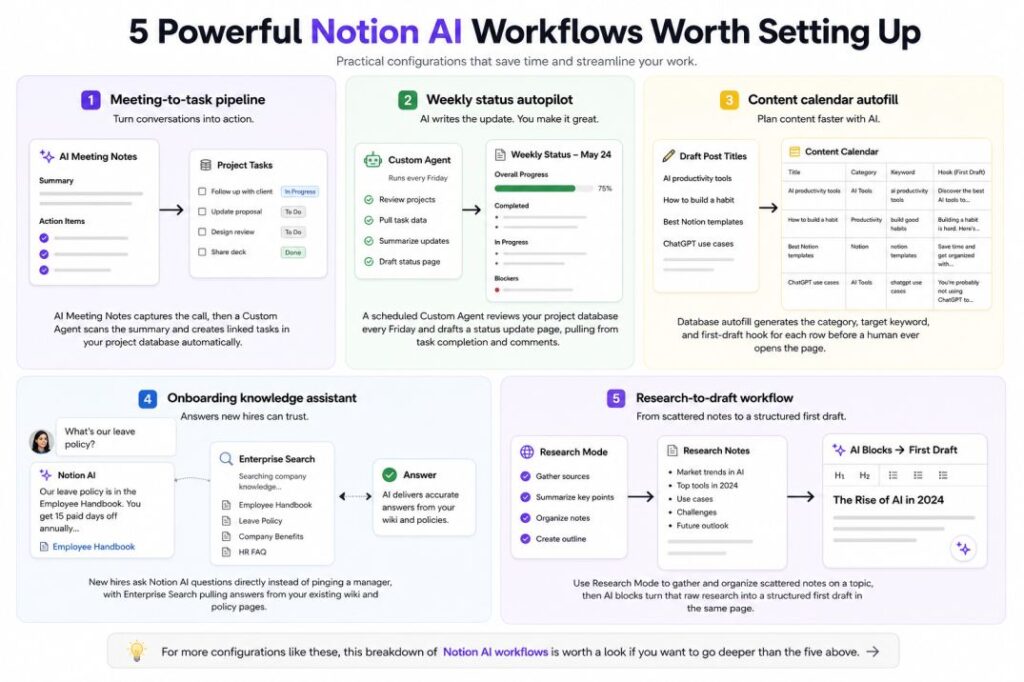
5 Powerful Notion AI Workflows Worth Setting Up
This is the part most reviews skip — actual configurations, not just feature names.
- Meeting-to-task pipeline: AI Meeting Notes captures the call, then a Custom Agent scans the summary and creates linked tasks in your project database automatically, so action items stop dying in a notes page nobody reopens.
- Weekly status autopilot: A scheduled Custom Agent reviews your project database every Friday and drafts a status update page, pulling from task completion and comments — you edit instead of writing from scratch.
- Content calendar autofill: Draft a batch of post titles, then let database autofill generate the category, target keyword, and first-draft hook for each row before a human ever opens the page.
- Onboarding knowledge assistant: New hires ask Notion AI questions directly instead of pinging a manager, with Enterprise Search pulling answers from your existing wiki and policy pages.
- Research-to-draft workflow: Use Research Mode to gather and organize scattered notes on a topic, then AI blocks turn that raw research into a structured first draft in the same page.
For more configurations like these, this breakdown of Notion AI workflows is worth a look if you want to go deeper than the five above.
Where Notion AI Still Falls Short
To be fair to readers comparing options, Notion AI is not a substitute for a dedicated automation platform. It doesn’t send notifications, trigger external webhooks on its own, or replace tools like Zapier and Make for cross-app workflows — a distinction one workflow-automation reviewer makes clearly, noting Notion AI is not built as a standalone automation tool. Custom Agents are also still Beta; community reports as recently as March 2026 flagged scheduled timers occasionally failing to run, so I wouldn’t build anything mission-critical on them yet without a manual fallback.
If you’re evaluating AI tools more broadly for solo or small-team productivity, it’s worth reading our guide to the best free AI tools before deciding whether a paid seat is the right first move.
Final Verdict: Is Notion AI Worth It?
If your team already treats Notion as its knowledge base and project hub, the AI layer genuinely compounds that investment — it’s reading documents you already have instead of starting from a blank prompt. If you’re evaluating Notion purely for the AI and don’t already use it for docs and databases, the $20/seat floor is a harder sell against cheaper standalone assistants.
The most sensible approach: pick one workflow where your team visibly wastes time — status updates, onboarding questions, meeting follow-ups — and run it for 30 days before rolling anything out further. That’s a far better test than judging the whole suite off a single afternoon of clicking around.
Have you tried Notion AI’s Custom Agents yet, or are you still on the fence about the Business upgrade? Drop your experience in the comments — and if you’re weighing Notion AI against other tools, subscribe for our upcoming side-by-side testing series on AI productivity stacks.