


Best AI Tools for Content Creators & Bloggers in 2026
Imagine staring at a blank screen at 2 AM, deadline looming, and your creativity has vanished. We’ve all been there. As a blogger who’s published hundreds of posts, I’ve felt the grind of research, drafting, editing, and designing visuals—all while trying to keep content fresh and engaging.That’s where AI tools step in—not as replacements for human insight, but as powerful collaborators that amplify what we do best. In 2026, the landscape of AI tools for content creators has matured dramatically. These aren’t just hype machines; they’re practical partners that save hours, spark ideas, and help maintain quality at scale.From my experience testing dozens of these platforms, the best ones blend seamlessly into your workflow. They handle the repetitive stuff so you can focus on strategy, storytelling, and that unique voice only you bring. Whether you’re a solo blogger, YouTuber, or social media manager, integrating the right ai tools can 2-3x your output without sacrificing authenticity. Let’s dive in.
Why AI Tools Have Become Non-Negotiable for Creators
This isn’t a fringe trend anymore. A 2026 creator economy survey from Kit found that nearly three-quarters of working creators now use AI at least weekly, and more than half use it every single day. Adobe’s 2026 Creators’ Toolkit report, based on over 16,000 creators worldwide, found a similar pattern: most say AI is directly growing their audience and their business, not just saving them time.
The interesting part isn’t that creators are using AI to generate content. According to the Kit survey, writing and brainstorming tied for the top use case — which tells you AI is functioning less like a content vending machine and more like a thinking partner people use to get unstuck.
There’s also a cost story here that’s easy to miss. Industry research tracking editorial budgets has found that AI-assisted articles can cost a fraction of what fully human-written pieces once did, which is exactly why solo creators and small teams can now compete with publications that used to have ten times their headcount. The tools aren’t just faster — they’re changing who gets to compete at all.
That said, more AI doesn’t automatically mean better content. Google’s own guidance is blunt about this: content gets evaluated on quality and usefulness, not on how it was produced, and mass-producing low-effort pages at scale falls squarely under what search engines now treat as spam. The creators pulling ahead are the ones using AI tools to work faster on good ideas, not to skip the thinking part entirely.
The Best AI Tools for Writing, Ideation & SEO
ChatGPT and Claude: All-Purpose AI Tools for Writing
Most creators don’t pick one AI writing tool and stop there. Coverage data from the Kit survey shows the majority of creators actually use both ChatGPT and Claude side by side, leaning on each for different strengths — one for fast drafts and brainstorming, the other for longer, more nuanced writing and editing passes.
The practical lesson: treat these tools as a first draft and a sounding board, not a finished product. The creators who get flagged for generic-sounding content are usually the ones publishing the raw output instead of rewriting it in their own voice.
Surfer SEO and Frase: AI Tools for Turning Drafts Into Rankings
Writing a good article and writing a rankable article aren’t the same skill. SEO-focused platforms analyze top-ranking pages for your target keyword and tell you what topics, headings, and word counts you’re missing before you hit publish. For bloggers chasing organic traffic, this step matters as much as the writing itself.
Storyflow and Notion AI: AI Tools for Keeping Content Organized
A recurring problem with chat-based AI tools is that they forget your content calendar, your brand voice, and your last five posts the moment you close the tab. Newer platforms like Storyflow are built around a persistent workspace instead, so the AI can see your full content plan rather than starting from zero in every conversation. Notion AI takes a similar approach for creators who already live inside Notion for outlines and research.
The Best AI Tools for Visuals, Video & Audio
Canva and Midjourney: Visuals Without a Design Degree
For fast, on-brand graphics — thumbnails, social posts, blog headers — Canva’s Magic Design and built-in AI image tools remain the easiest entry point for non-designers. When a graphic needs to look genuinely original rather than templated, Midjourney is the better choice for generating distinctive, high-aesthetic images from a text prompt.
Adobe Firefly: AI Inside a Familiar Ecosystem
If you already edit in Photoshop or Premiere, Adobe Firefly’s biggest advantage isn’t raw creative power — it’s that it’s built into tools you already use, with clearer commercial licensing than many standalone image generators.
Runway ML and Synthesia: The New YouTube Toolkit
Video creators have arguably benefited the most from AI. Runway ML handles background removal, object tracking, and text-to-video effects without needing a powerful editing rig, while Synthesia generates AI avatar videos for creators who want to publish without being on camera every time.
Descript and Otter: Editing That Doesn’t Feel Like Editing
For podcasters and video creators, Descript turns audio and video editing into a text-editing task — cut a sentence from the transcript, and it cuts the clip. Otter handles fast, accurate transcription for anyone repurposing spoken content into blog posts or captions.
Comparison Table: Best AI Tools at a Glance
| Tool | Best For | Standout Feature |
|---|---|---|
| ChatGPT / Claude | Writing, brainstorming, research | General-purpose reasoning and drafting |
| Surfer SEO / Frase | SEO optimization | Data-backed content scoring against top-ranking pages |
| Storyflow | Blog & content planning | Persistent workspace the AI can “see” across sessions |
| Canva | Quick social & blog graphics | Magic Design + AI image generation |
| Midjourney | Original, high-aesthetic images | Distinctive text-to-image output |
| Adobe Firefly | Adobe-ecosystem creators | Commercial-safe licensing, deep Creative Suite integration |
| Runway ML | Video editing & effects | AI background removal, text-to-video |
| Synthesia | Faceless video content | AI avatar video generation |
| Descript | Podcast & video editing | Edit audio/video by editing a transcript |
Key Insights: Building a Stack, Not Just Collecting Apps
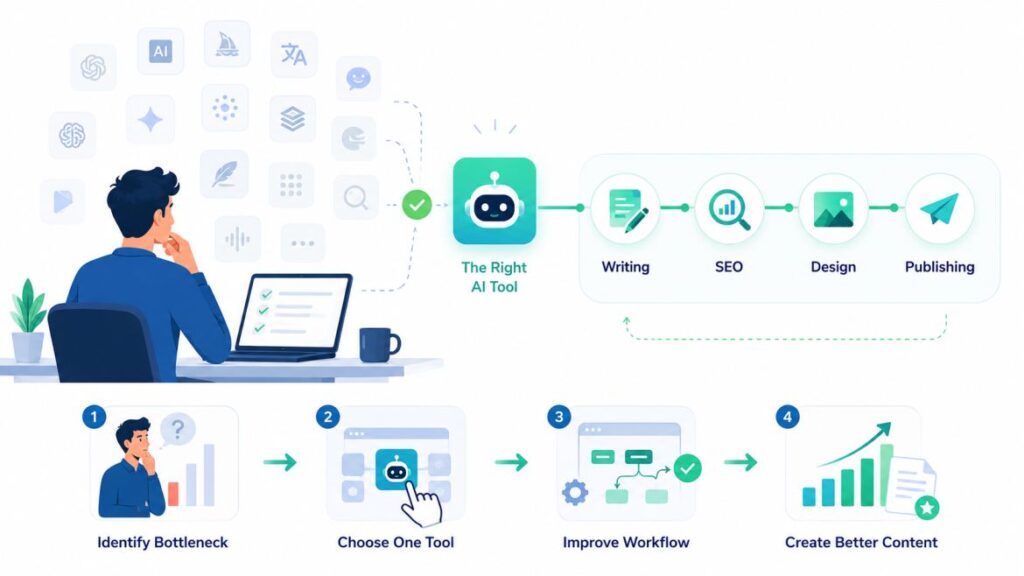
You don’t need one perfect tool — you need the right three or four. Most working bloggers in 2026 aren’t relying on a single AI app; they’re running a small stack: one for drafting, one for SEO, one for visuals, and one for organization. Trying to force a single tool to do everything usually produces worse results than each tool doing what it’s actually good at.
AI works best as a research and thinking partner, not an autopilot. The tools that survive scrutiny from readers and search engines are the ones used for outlining, fact-checking angles, and clearing writer’s block — with a human doing the final rewrite in their own voice.
Editing is what separates ranking content from ignored content. Search engines don’t penalize AI-assisted writing on principle; they penalize low-quality, unedited content published at scale. The gap between a generic AI draft and a genuinely useful post is almost always the human editing pass that happens after.
Start with the bottleneck, not the shiny new tool. It’s tempting to sign up for every AI app that trends on social media, but the creators who actually save time pick one clear bottleneck first — slow drafting, weak thumbnails, inconsistent posting — and solve that before adding anything else to the stack. A tool you use daily for one real problem beats five tools you tried once each.
Frequently Asked Questions
Do I need to disclose that I used AI tools to write my blog posts? There’s no universal legal requirement to disclose AI assistance for most blog content, but transparency builds trust — many creators mention it briefly when AI played a significant role.
Will using AI tools hurt my SEO rankings? Not inherently. Search engines evaluate content on quality and usefulness, not on whether AI was involved in producing it — the risk comes from publishing unedited, low-value content at volume.
What’s the best free AI tool to start with? If you’re just beginning to build a workflow, start with a general-purpose assistant like ChatGPT or Claude for drafting, then add specialized tools as specific bottlenecks show up. (See our roundup of the best free AI tools for a deeper breakdown.)
Final Thoughts
The gap between creators who thrive in 2026 and those who burn out isn’t talent — it’s workflow. The tools above won’t write your voice for you, but they’ll clear out everything standing between your ideas and a published post.
Which of these AI tools are already part of your workflow, and which one are you adding next? Drop a comment below, or subscribe for more deep dives on building a leaner, smarter content process.